
Tessie — Track your Tesla
TessieLifestyle
4.7320.00 Reviews
- Version
- 16.0.29
- Installs
- 100.00K
- Age Rating
- Everyone
Screenshots
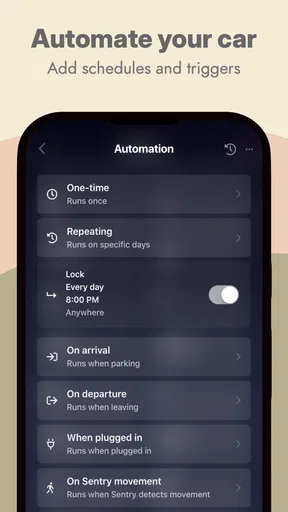
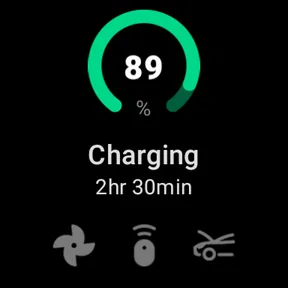
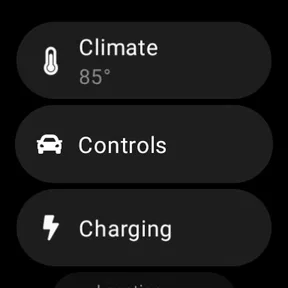
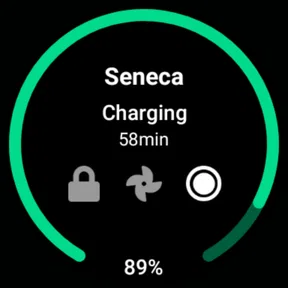
Our Review of Tessie — Track your Tesla
 Analysis by Appyee
I tend to judge a connected-car app less by how many controls it can show and more by whether it makes ordinary ownership easier. That is where Tessie — Track your Tesla aims to help: bringing vehicle status and driving information together on a phone. It is a free lifestyle app from Tessie, rated for Everyone, and it has drawn a 4.6 average from around 6,400 ratings, with over 100,000 installs. Those figures suggest an established audience, but the practical question is whether its extra detail suits the way you use your Tesla.
Where setup and first use can feel less effortless
The basic idea is straightforward, but a connected vehicle app depends on more than installing it. You need to be comfortable linking it to your Tesla account and granting whatever access the connection process asks for. I would take a moment to read each prompt rather than tapping through quickly: an app that can display vehicle information deserves the same account-security care as any other service connected to your car.
If the vehicle does not appear as expected, I would first check that I am using the intended Tesla account and that the car itself is online. Then I would close and reopen the app, give the connection a little time, and check again before repeating setup. These are simple checks, not guarantees; a temporary connection delay can look like a setup failure even when nothing needs to be reconfigured.
Small setup choices that make the information more useful
Before relying on notifications, I would decide which events are genuinely useful in my routine. A charging-complete alert can save a trip to the garage, while too many low-value notices can train you to ignore all of them. Start with the reminders you would act on, then adjust only after you have lived with them for a few days.
It also helps to treat a dashboard as a quick reference rather than as a substitute for checking the car when something matters. A phone can be out of date, offline, or simply not refreshed at the moment you look. If a status seems inconsistent, compare it with what the vehicle shows before making a decision about a trip or charging plan.
How to recover a workflow when something looks wrong
When a trip or charging detail seems missing, I would avoid changing several settings at once. First refresh the view; then check whether the relevant drive or charging session has had time to appear. If the basic vehicle status is also stale, that points more toward a connection issue than toward a problem with a single report. Keeping the checks simple makes it easier to tell whether the issue has cleared.
For cost and efficiency records, consistency matters more than a single striking number. If you use the app to understand charging expenses, enter or review the information you depend on in a consistent way and compare like with like. Home charging and public charging can have different costs, so a blended figure may not answer the question you actually care about. I would use the records to spot patterns, not treat every estimate as a bill.
When the app may not be the cause
A phone app cannot make a weak vehicle connection, a network interruption, or a change in the car’s own state disappear. If an alert fails to arrive, check the phone’s notification settings as well as the app, and confirm that the vehicle is reachable. If the car itself shows a warning, use the vehicle’s own guidance rather than assuming a third-party dashboard can diagnose it.
There is also a broader trade-off in choosing a connected service: convenience comes with account access and another place to manage personal vehicle information. If you would rather keep everything inside Tesla’s own tools, or you rarely need trip history and charging analysis, the extra layer may not be worth it. That is a reasonable preference, not a failure to use the app properly.
Getting Started with Tessie
The first thing that struck me about Tessie is its user-friendly interface. Getting started is a breeze. All you need to do is download the app from the App Store or Google Play. Once installed, you simply log in with your Tesla account credentials, and voilà, you're connected. The setup process is smooth, and within minutes, you’re ready to explore all the features this app offers.
A Dashboard to Love
One of my favorite features is the dashboard. It's sleek and intuitive, giving you a comprehensive overview of your vehicle's status. You can see everything from your battery level to your car's location at a glance. The app presents this information in a way that's not only easy to understand but also quite visually appealing. It’s like having your Tesla’s brain right in your pocket.
Features That Stand Out
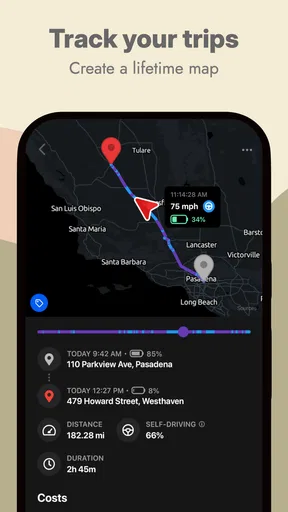
Now, let’s dive into some of the standout features that Tessie offers. First off, the real-time tracking is superb. Whether you're monitoring your daily commute or planning a road trip, you can track your car’s location and even review past trips. This feature is perfect for those who love to keep tabs on their driving habits or simply want to ensure their car is where it should be.
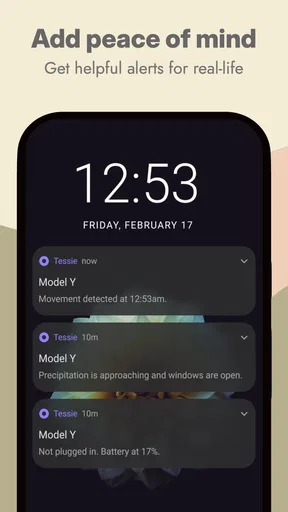
Another feature I can't get enough of is the charging management. Tessie provides detailed insights into your charging sessions, including costs and efficiency. It even sends you notifications when your car is fully charged or if there’s an issue. This is a game-changer for optimizing your charging routine and saving a few bucks along the way.
Integrations and More
What really sets Tessie apart is its integration capabilities. It seamlessly connects with other smart home systems, allowing you to do things like open your garage door as you arrive or adjust your home’s thermostat based on your car’s location. It's like having a personal assistant integrated with your vehicle, making your life just that much easier.
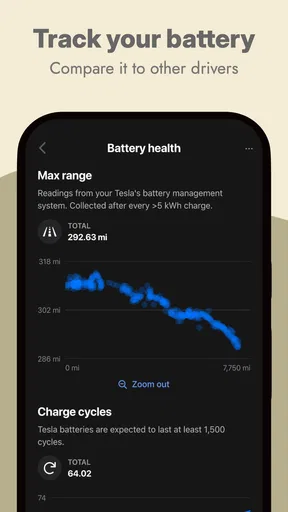
Also, for those who love data (and honestly, who doesn’t?), the app provides detailed analytics. You can access reports on your driving efficiency, energy consumption, and even environmental impact. This data is not only fascinating but also incredibly useful if you’re looking to improve your driving habits or reduce your carbon footprint.
All the Little Details
And let’s not forget the little details that make a big difference. Tessie offers customizable alerts and reminders. You can set it up to remind you about tire rotations, scheduled maintenance, or even when to check your tire pressure. These small but thoughtful features help keep your Tesla in top shape without much effort on your part.
Additionally, the app’s design and performance are top-notch. It runs smoothly, with no noticeable lag or glitches. The developers clearly put a lot of thought into the user experience, making it a joy to use every day.
Choosing it for the right kind of ownership
I see the strongest case for this app if you like turning vehicle activity into a useful routine. A driver who charges at home, occasionally uses public chargers, and wants to understand where energy goes can get more from the charging history than someone who plugs in without tracking anything. Trip records can also help if you want to compare a familiar commute with a longer drive, rather than relying on memory or a rough impression of efficiency.
For example, imagine arriving home after a busy day and plugging in before making dinner. Instead of checking the car repeatedly, you can use a completion alert to know when charging is done, then review the session later if you are keeping an eye on costs. On another day, trip history may help you understand why a route felt less efficient. The value is not that the app makes a decision for you; it puts the details in one place so you can make a better-informed one.
That focus also distinguishes it from the usual alternatives. Tesla’s own app is the natural first stop for owners who mainly want direct access to their vehicle, while a general lifestyle or smart-home app is not built around Tesla trip and charging records. Tessie’s appeal is the added view across those patterns. I would not install it expecting every owner to need a second dashboard; its advantage is most convincing when you will actually use the history, analytics, alerts, or integrations.
Useful habits, with a few trade-offs
One practical tip is to choose a question before opening the analytics. Are you comparing energy use between routes, checking how often you charge, or trying to understand session costs? A focused question makes a report easier to interpret and helps prevent interesting-looking data from becoming noise. For cost comparisons, keep home and public charging separate when possible; otherwise, one average can conceal the difference you wanted to see.
Another useful habit is to give the app time to build a record before drawing conclusions. A single trip can be affected by route, weather, traffic, and driving choices, so I would look for a repeated pattern rather than overreacting to one result. The same restraint applies to alerts: keep the ones that prompt a useful action and remove the ones that merely add interruption. This is a small bit of maintenance that can make a connected app feel helpful instead of demanding.
Smart-home links can make arrival routines feel seamless, but they are not essential to getting value from the app. I would add them only after the basic vehicle connection and notifications behave as expected. That way, if an automation does not run, you can separate a vehicle-data issue from a home-system issue instead of troubleshooting several moving parts together.
Who should look elsewhere
If you only need the occasional battery check or basic vehicle control, Tesla’s own app may already cover your needs with fewer services to manage. Tessie is also a poor fit if you do not want to connect another app to your vehicle account, or if you are unlikely to review trip and charging information after the novelty wears off. I would not recommend paying for extra capabilities simply because a long feature list sounds impressive; first decide which parts of your ownership you want to make easier.
The app is free to install, but it includes in-app purchases ranging from $3.99 to $499.99 per item, so I would check the current purchase details in the app before committing to anything. That broad range makes it especially sensible to start with the free experience and judge its everyday value for yourself. The app has been available since June 4, 2020, and version 15.8.1 requires Android 8.0 or later; those details matter if you are checking compatibility or considering an older phone.
Final Thoughts
So, if you're a Tesla owner looking to get the most out of your vehicle, I highly recommend giving Tessie a try. It’s packed with features that make driving smarter, easier, and more enjoyable. Plus, the peace of mind knowing you have complete control and insight into your car is simply priceless. You can download it today and start experiencing your Tesla in a whole new way.
In the end, Tessie — Track your Tesla is more than just an app; it’s a companion for your Tesla journey. Whether you're a tech geek or just love your car, this app is bound to impress. Happy driving!
Verdict
Strengths of Tessie — Track your Tesla
- Intuitive interface for easy navigation.
- Detailed vehicle insights and stats.
- Real-time location tracking feature.
- Customizable notifications and alerts.
- Supports multiple user profiles.
Limitations of Tessie — Track your Tesla
- Requires subscription for full features.
- Limited offline functionality.
- Occasional sync delays with vehicle.
- Not compatible with non-Tesla models.
- Some features need Tesla API access.
Similar Picks in This Category
View All
SmartThings
Samsung Electronics Co., Ltd.4.6

Google Home
Google LLC4.0

Pinterest4.2

Astrotalk - Talk to Astrologer
Astrology & Horoscope4.7

My Verizon
Verizon Consumer Group4.5

Samsung Wallet (Samsung Pay)
Samsung Electronics Co., Ltd.4.1
Frequently Asked Questions
What features does Tessie offer for Tesla owners?
Tessie provides a comprehensive suite of features for Tesla owners, including real-time tracking of your vehicle's location, detailed charging statistics, and driving history analysis. It also offers smart alerts, such as reminders to plug in your car, and integrates seamlessly with your Tesla account for easy access to all these insights.
Is Tessie compatible with all Tesla models?
Yes, Tessie is designed to be compatible with all Tesla models, including the Model S, Model 3, Model X, and Model Y. The app utilizes Tesla’s API to ensure that it can communicate effectively with your vehicle, regardless of the model or year, providing consistent performance and functionality.
How does Tessie ensure user data privacy and security?
Tessie prioritizes user data privacy and security by using advanced encryption protocols to protect all data transmissions. Your Tesla account credentials are never stored on their servers, and the app only requests permissions necessary for its core functionalities, ensuring that your personal and vehicle information remains secure.
Does Tessie require a subscription, and what are the costs involved?
Tessie operates on a subscription model, offering various pricing tiers based on the features you wish to access. While there may be a free trial period, ongoing access usually requires a monthly or annual fee. This subscription supports app development and ensures continuous enhancements and support.
Can Tessie be used without an internet connection?
Tessie requires an internet connection to function effectively as it relies on real-time data from Tesla’s servers. While some basic features may still be accessible offline, the app needs connectivity to update vehicle data, location, and other essential functionalities, ensuring you receive the most accurate information.
